





Get CreatorHQ

Built in Notion

Great creators need great systems.

CreatorHQ is the Notion workspace I run Creator Science on: your content, tasks, people and partners in one place, with a video tutorial on every page that matters. It's built for creators who've tried Notion and quit. Or never dared.

Get CreatorHQ · $197

Pay once, use forever.

“As a huge Notion hater, I LOVE what you created.”
Mike Cardona
Creators using it
1,000+
Video tutorials inside
30
Of building and testing
3+ years
Pay once, use forever
Once

Sound familiar?

You've bought a Notion template before.

Maybe a few. They were too complicated, too fancy, or they made you feel bad for not using all of it. So you went back to sticky notes, a dozen Google Docs and whatever you could hold in your head.

That's not a you problem. Most templates are built by Notion experts to show off what Notion can do. I'm not a Notion expert, and you don't need to be one either. CreatorHQ was built by a non-expert, for non-experts, and every important page teaches you how to use it.

“I've spent so much money on Notion templates that either weren't as robust as I expected or were too complicated to use. CreatorHQ is the first Notion template that I can actually understand AND I am actually using long-term!”

Mindy MarzecMindset Coach for Content Creators★★★★★

“I've been wanting to love Notion for years, but keep straying away from it because there is inherent friction with starting… I can already feel myself sticking with the tool for the long haul.”

Chenell BasilioGrowth In Reverse★★★★★

“I'm finally excited to open up Notion and use it instead of endlessly tweaking it. Crazy right?”

Trent HaireCreator★★★★★

Why I built it

Most productivity systems were built for managers, not makers.

Have you looked at the creators you admire and wondered, "How do they do it all?" You're not crazy. Keeping up with the demands of being a creator is hard. There's always a deadline, and most of what's on your plate has nothing to do with creating.

The more successful you get, the more complex the business gets. Suddenly the thing you love most is the smallest part of your week.

I've lived that. And I noticed that the most successful creators, team or no team, are supported by excellent systems. The problem is that most of those systems assume your work is linear, when the creative process is anything but. So you end up fighting your tools instead of using them.

That's why we built CreatorHQ: a thinking system that brings all your work into one clear view, so you spend less time context switching and more time in creative flow. It's the same system we use to run Creator Science. We spent more than three years building it, and now you can have it out of the box.

“As a creator, Jay Clouse has been able to successfully grow his audience on multiple channels. I've always wondered: 'How does he do all that?' Now I know: he has a killer system.”

Justin JacksonCo-founder, Transistor★★★★★

“Jay creates an ungodly amount of GOOD content. I often wondered how he got so much done. Well, no need to wonder anymore—CreatorHQ is the answer.”

Katelyn BourgoinWhy We Buy★★★★★

What changes

CreatorHQ helps you do three things.

  1. 1

    Nothing falls through the cracks

    Save more time

    Goals, projects and tasks live together, and your Owner Dashboard shows only what's due today. Have an idea at 3am? Capture it from your phone, and it's waiting when you sit down.

  2. 2

    Publish on a plan, not on panic

    Publish more content

    Plan every platform in one content calendar, turn one idea into posts everywhere, and let CreatorHQ flag the old pieces worth publishing again.

  3. 3

    Run the business, not just the content

    Drive more revenue

    The people, partners, sponsorships and processes behind your work sit right next to your content, so the business side stops living in your inbox.

★★★★★
“CreatorHQ has helped me plan my content more in advance and stick to the plan - which had been my main bottleneck for years.”
JustineCreative Director & YouTuber · January 2026

You won't get stuck

30 videos, placed exactly where you'd get stuck.

We're not Notion-certified consultants, and you probably aren't either. Most Notion templates focus on the sale and leave you to figure out the rest.

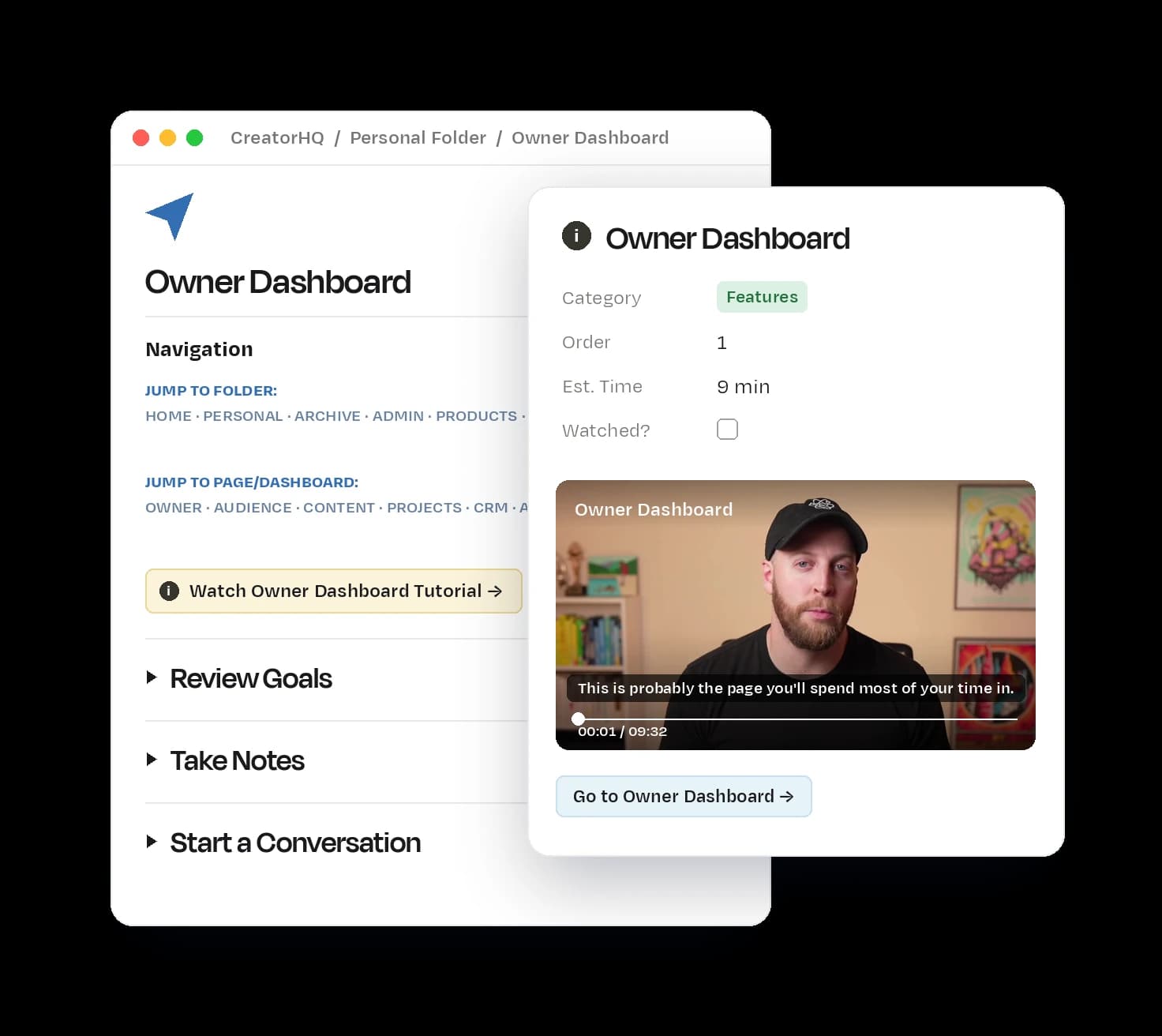
We took a different approach. The most important pages in CreatorHQ have a short video from me built right in, so you learn each part the moment you need it.

  • Tutorials right where you need themClick the yellow button on a page and its walkthrough opens beside it.
  • A tutorial libraryEvery video in one place, plus some basic Notion training if you're brand new.
  • Tooltips on everythingEvery database and property explains what it's for, with an info icon.
CreatorHQ's Owner Dashboard page in Notion

“I had tried Notion before but gave up quickly—I didn't fully understand it and hesitated to commit to another tool… The clear, step-by-step tutorials Jay provides inside made all the difference. Within hours, I was up and running.”

Jacob CassBrand Designer, Strategist & Coach★★★★★

“I've watched most of his detailed training videos, but the platform works so well that I barely need them.”

Peter BaronFounder★★★★★

The full tour

See all of it in 11 minutes.

A walkthrough of every part of CreatorHQ and how the pieces connect, so you know exactly what you're getting before you buy.

Get CreatorHQ · $197

Pay once, use forever.

Full tour · 11:30

What's inside

Everything a creator business runs on, in one workspace.

Use two dashboards or all of them. Most people start with tasks and content and grow into the rest.

Tasks, projects & goals

See today, and how it adds up to the year
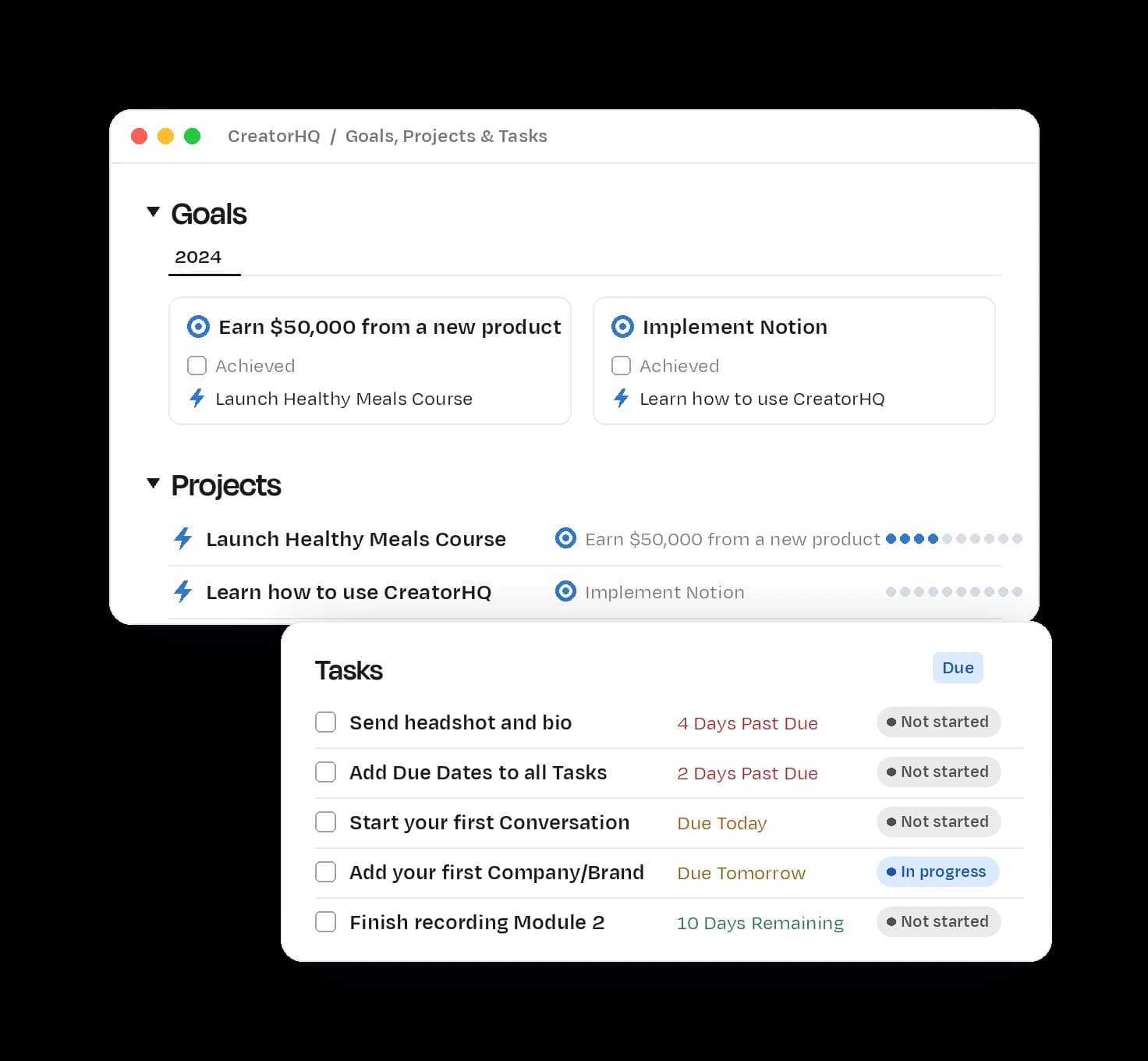
CreatorHQ's Goals, Projects & Tasks page in Notion

Your goals, projects and tasks are connected, so everything you do ladders up to the bigger picture. Work and personal to-dos live in one task list, with pre-made dashboards so you only see what matters now.

  • Drag tasks onto your calendar to set deadlines
  • Track progress toward every project and goal
  • Capture tasks and ideas from your phone with the mobile widget

“I've tried a handful of Notion dashboards to organize my one-person creator business, but they all feel complicated or too fancy… Within the first few days, I've got my goals, projects and tasks lined up, and an outline for a new course all planned out.”

Nate KadlacFounder, Approachable Design★★★★★

Content calendar

Plan every platform from one calendar

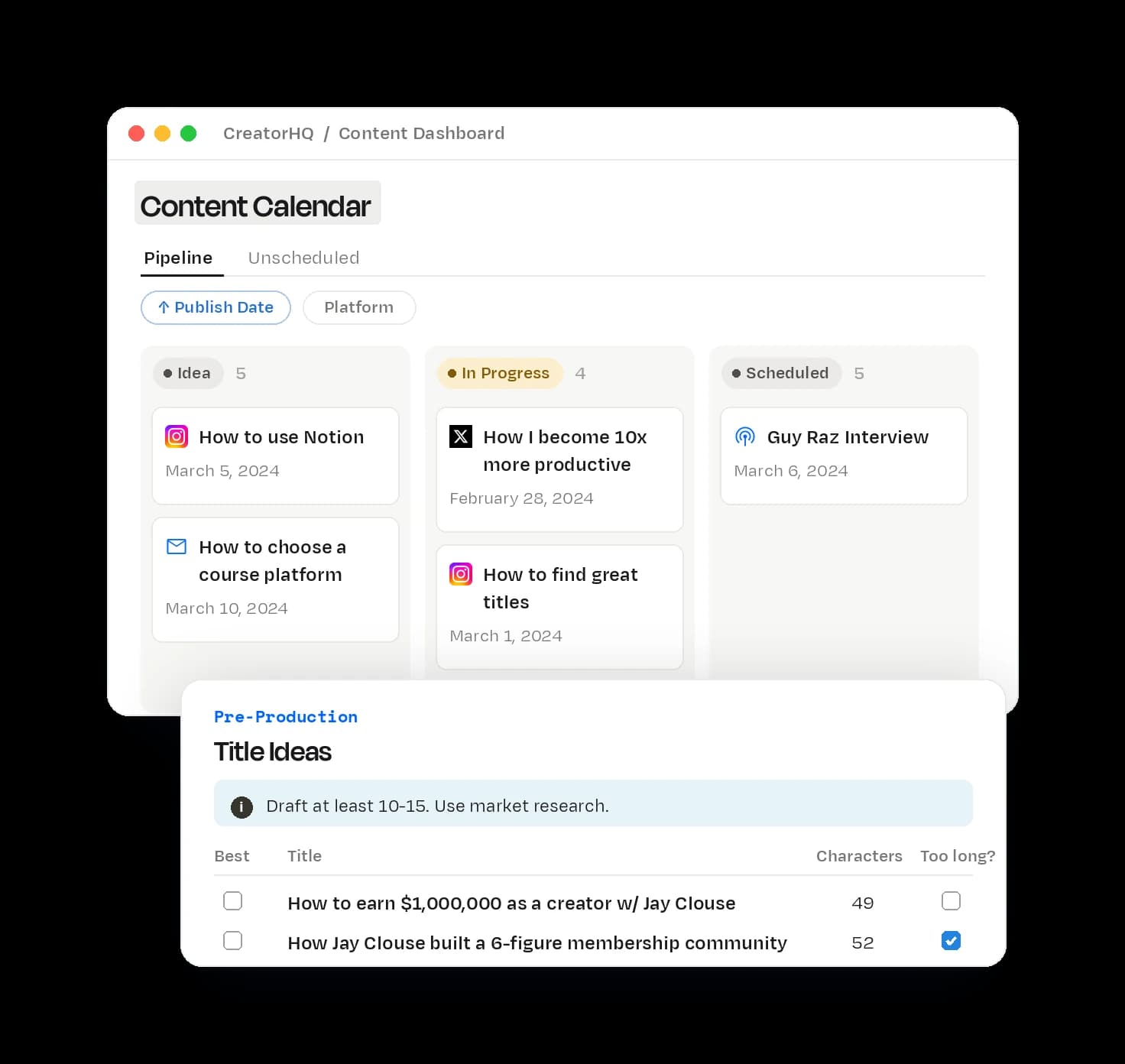
CreatorHQ's Content Calendar page in Notion

Visualize your whole pipeline from idea to published, with ready-made templates for YouTube, podcasts, newsletters, X, LinkedIn, Instagram, Shorts and TikTok. Drag ideas onto the calendar and see what's done and what still needs you.

These are the processes and templates we use for every Creator Science episode and newsletter, baked right in.

  • Turn one idea into posts everywhere with the repurposing matrix
  • Your calendar is on every dashboard, so it's never more than a click away

“Just started playing with the HQ three days ago, and it's already part of my daily workflow. I am now more structured and ready to publish everyday consistently!”

Killian TalionContent Creator★★★★★

Republishing calendar

Publish more without making more

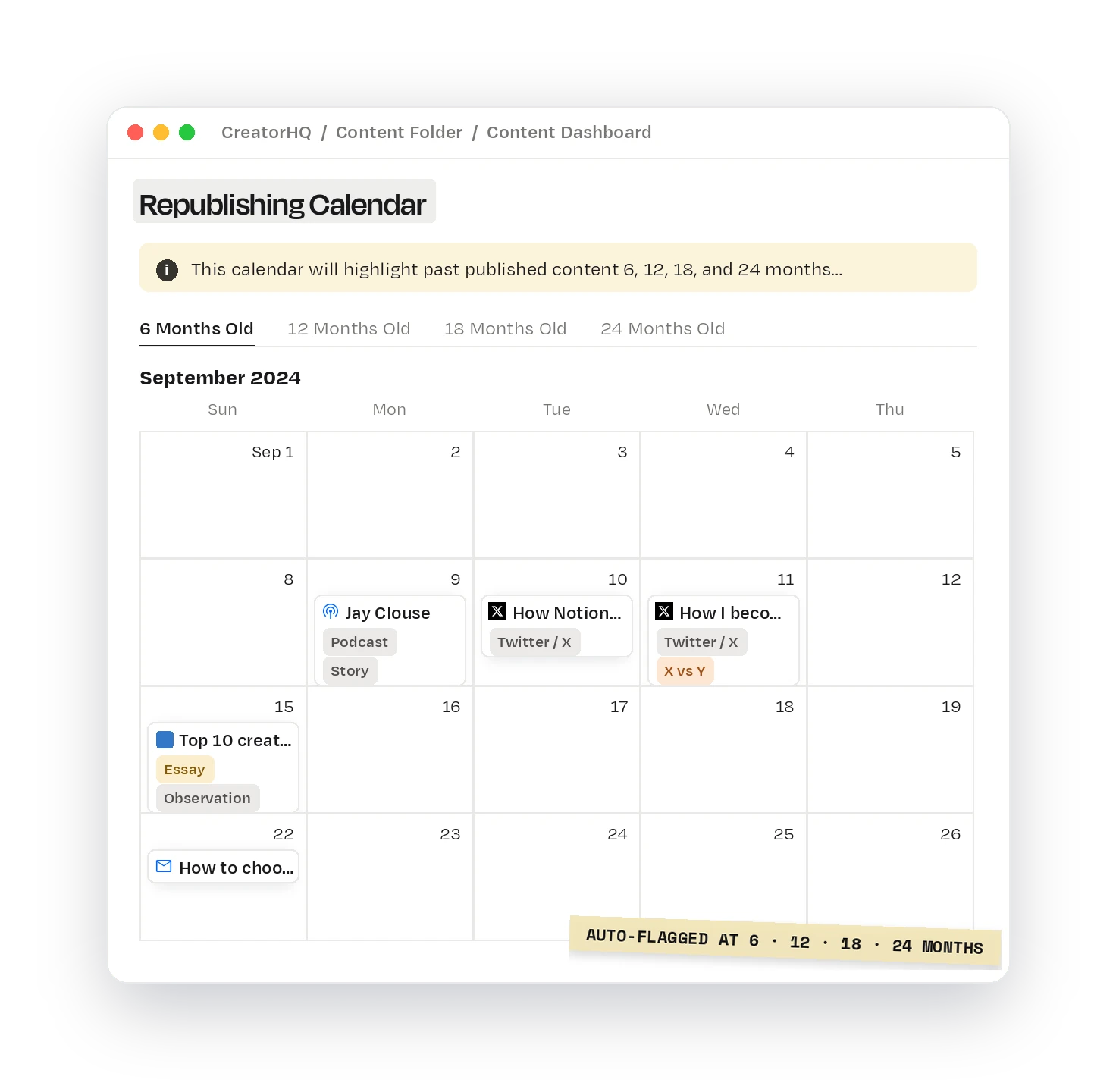
CreatorHQ's Republishing Calendar page in Notion

Every piece of content is automatically flagged for republishing at 6, 12, 18 and 24 months. Revive your best work, or use it as the spark for something new. Either way, you publish more.

“I also love the 6-month, 12-month content repurposing calendar. CreatorHQ automates many different and/or recurring tasks that I used to do manually.”

JustineCreative Director & YouTuber★★★★★

Audience

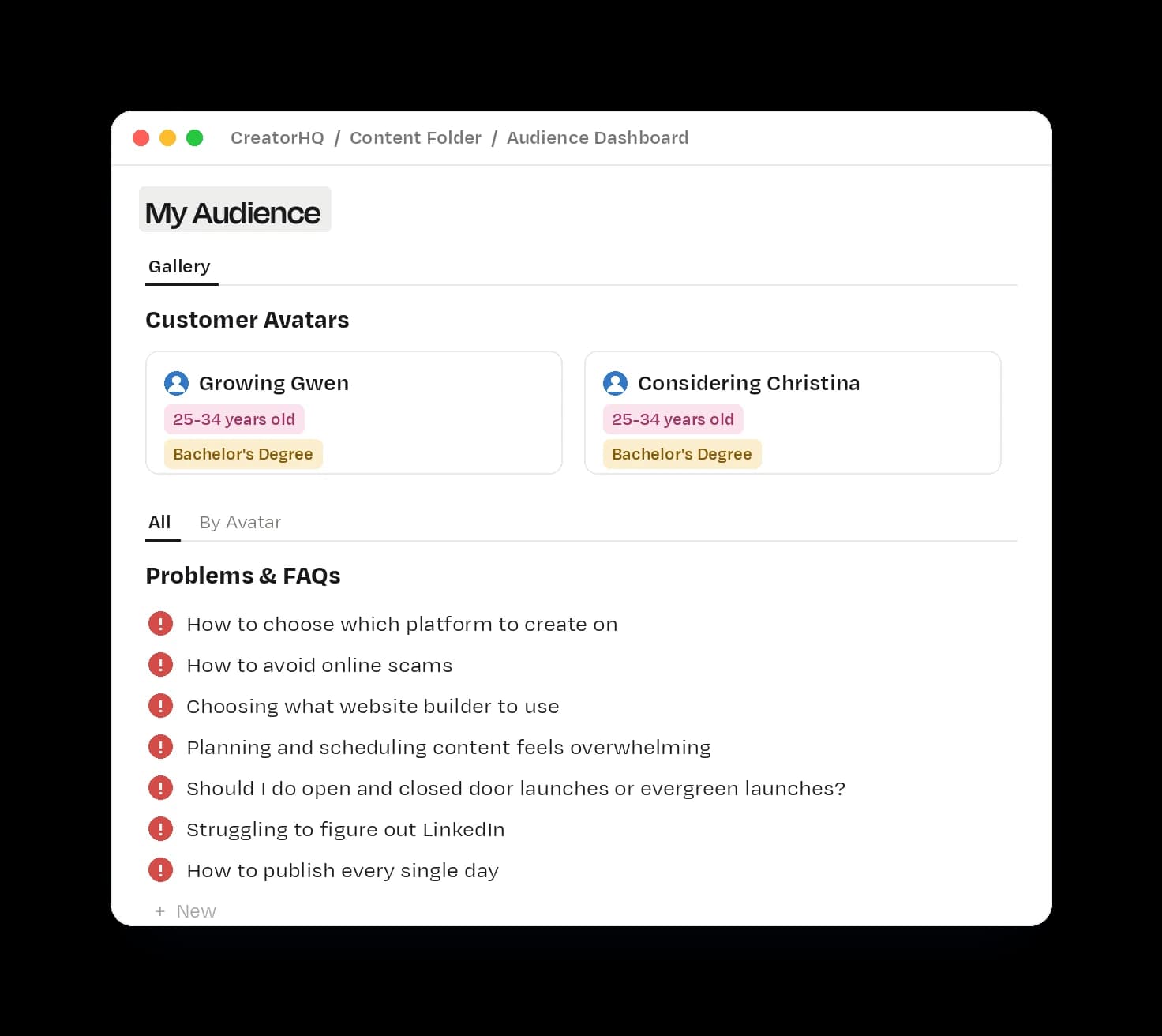
Turn what your audience asks into what you make next

CreatorHQ's Audience Dashboard page in Notion

Define your audience avatars with guided steps, then log the problems and questions you hear from them as they come up. Those problems sit right above your brainstorming, so you're never staring at a blank page.

“I especially love how all the content ideas are connected to your overall business (avatar, their problems etc) so it's not just content ideas for content's sake.”

Sue McLachlanKajabi Strategist★★★★★

Lightweight CRM

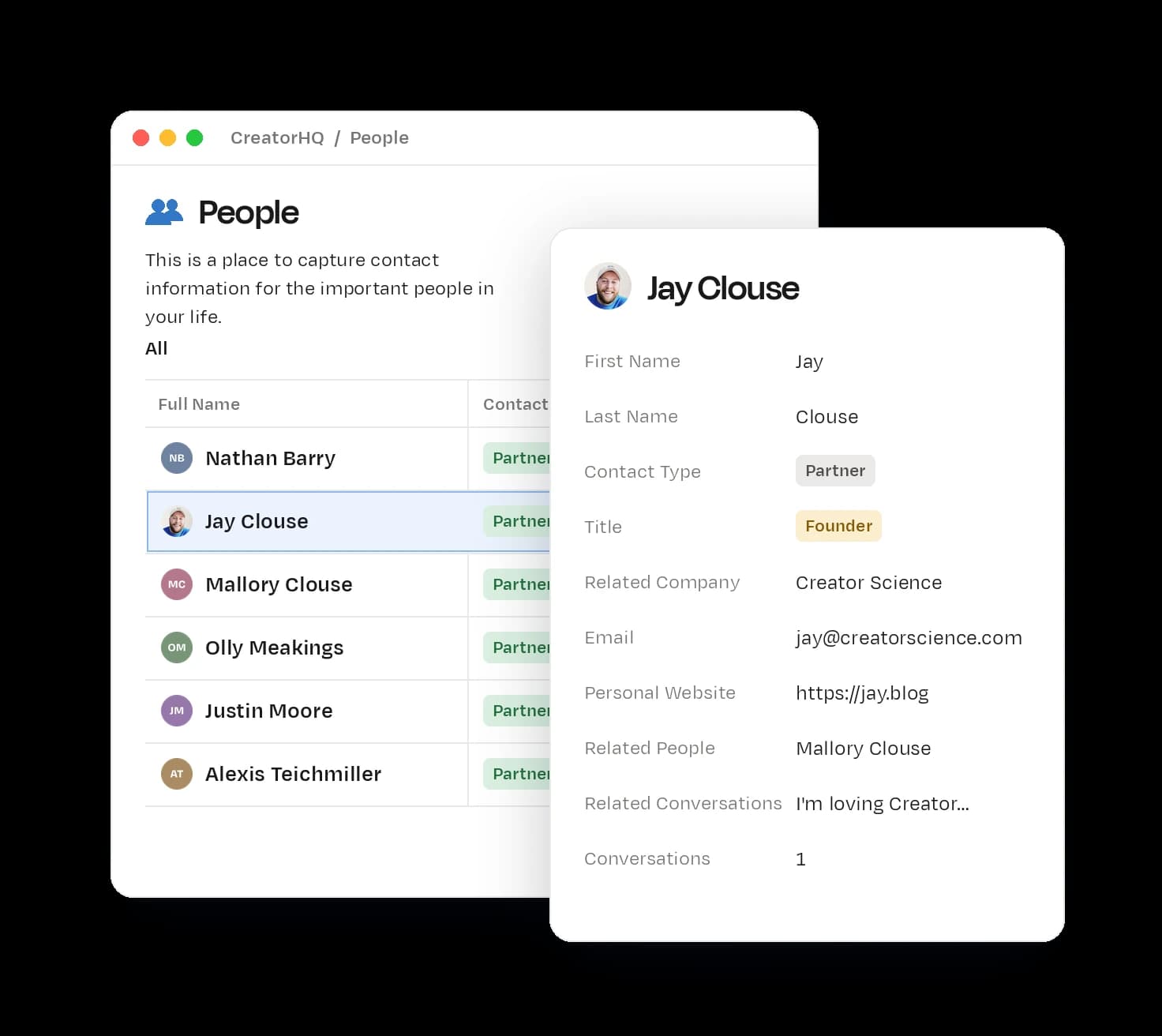
Keep up with the people who matter

CreatorHQ's People page in Notion

Most CRMs are too complex or too expensive. CreatorHQ has a lightweight one for people and companies, with a Conversations database that makes it easy to log outreach and reconnect at the right time.

“I'm able to keep track of my coaching clients and calls in a systematic way thanks to his lightweight CRM and action things all from inside Notion.”

Sam MillunchickPublic Speaking and Communications Coach★★★★★

SOPs

Delegate without it bouncing back

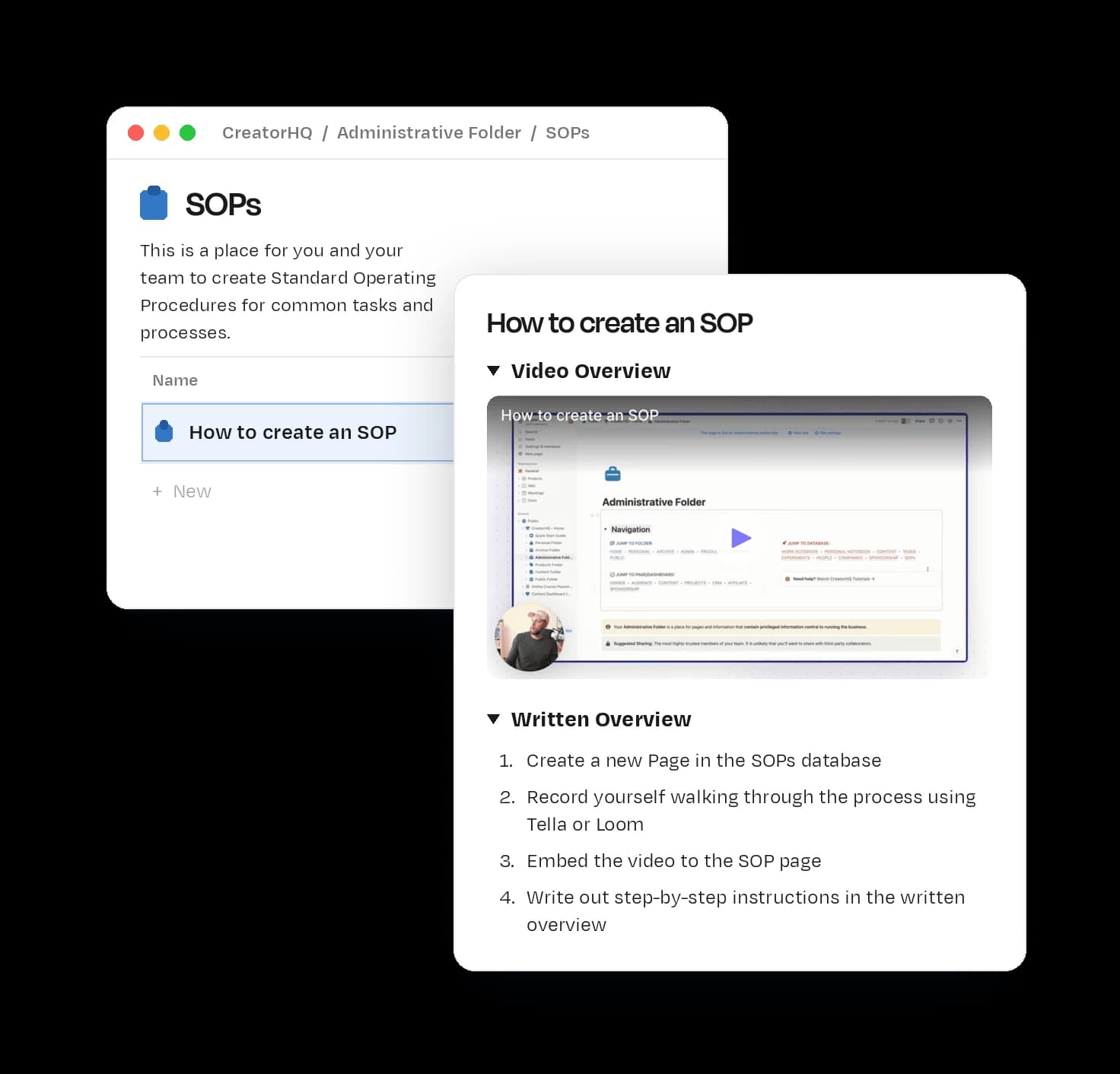
CreatorHQ's SOPs page in Notion

As you grow, you'll want help. Document how you do things in Standard Operating Procedures, record a quick Loom or Tella and drop it in, and your SOP library becomes the instruction manual for your business.

“CreatorHQ helped me visualize the complex steps of creating and repurposing content. I feel like I can finally delegate some things to my team without those things bouncing back onto my plate.”

Carina ClingmanCo-founder★★★★★

Sponsorships & revenue

Know who owes you, and land the next deal

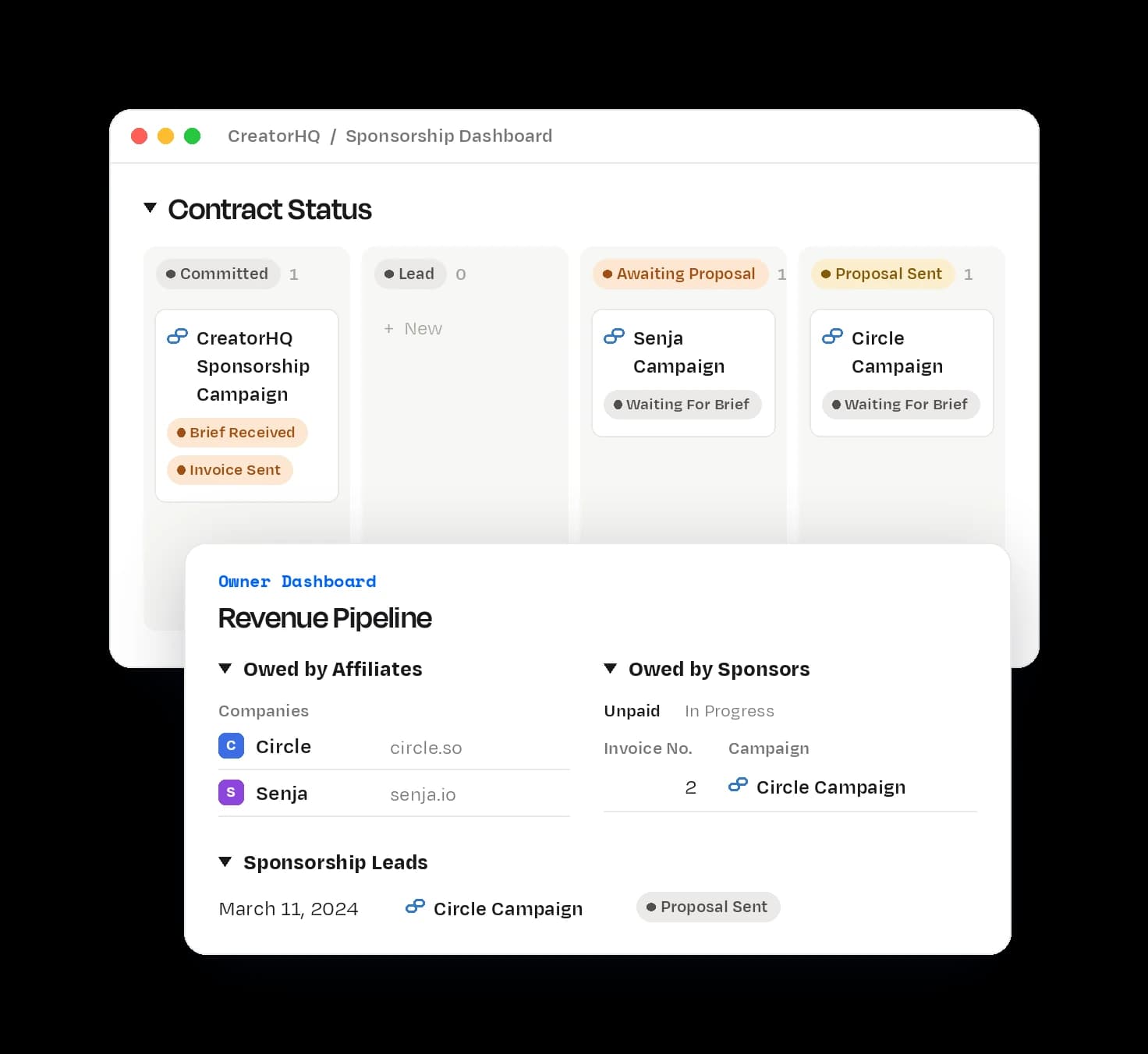
CreatorHQ's Revenue Pipeline page in Notion

Track sponsorships from first lead to finished campaign: contracts, creative briefs, scripts and results, without handing 20–40% to a partnership manager. The Owner Dashboard shows outstanding sponsorship payments, affiliate commissions and speaking fees, so Net-60 doesn't turn into never.

Not there yet? No problem. It's ready when you are.

Reviews

Loved by 1,000+ creators.

“This isn't just another Notion template. It's a powerful workspace that's both elegantly designed and highly functional.”

Jon YoushaeiCreator & YouTube strategist★★★★★

“When I first saw Jay releasing CreatorHQ, I thought: as a small one-person operation, this is probably "a bit much" for my needs… This is one of the best purchases I've made in the past three years – it saves me time everyday, helps me stay focused on the big goals, and will scale as I do.”

Andrew LangCreator★★★★★

“CreatorHQ saved my sanity! I'm in the middle of a pivot and juggling 2 newsletters, posting on 3 different platforms, and launching a new podcast and YouTube channel… I'm organized and on top of things. I can finally sleep at night.”

Lisa KostovaCareerClimb® Co★★★★★

“This is the one creator business tool to rule them all.”

Justin MooreCreator Wizard★★★★★

“Prior to finding CreatorHQ, my notion workspace was a CLUSTER! Organized chaos, if you will. Switching to the CreatorHQ was like cleaning a cluttered room and magically having a spot for everything.”

Trey RobbinsFounder★★★★★

“I have a complicated form of ADHD, and I was growing increasingly frustrated because I could not find or create a tool for myself to manage my business like I aspired to. This is the type of structure I need.”

Erin WhiteStrategic Advisor + Business Coach★★★★★

“This is hands down the BEST productivity tool I've ever used and it's worth WAY more than the price I paid… If you never used Notion, don't worry. There are a bunch of very helpful videos placed throughout the template.”

Diane BonheurEntrepreneur & Content Creator★★★★★

“CreatorHQ is a thing of beauty. I'm just now going through the steps to implement it and wow. Just wow.”

Austin L. ChurchFounder of Freelance Cake★★★★★

“Jay's inclusion of video tutorials throughout the learning process was a game-changer, making everything seem manageable rather than daunting.”

Dr. Megan Anna NeffFounder of Neurodivergent Insights★★★★★

“I'm so excited (and honestly, more than a little bit relieved) to have a tool that makes organizing content — and my business overall — easy and seamless.”

Lauren TildanMarketing Coach★★★★★

“I've tried a few templates before, but never found an easy way to onboard my business onto Notion. Until now… It's not just a template, it's an upgraded ways of working.”

Cecilia BrattBusiness Coach★★★★★

“I had a basic understanding of Notion but could never take it further and develop my own operating system and pages. Enter Creator HQ and the problem was solved.”

Paul CopcuttContent Marketing Strategist★★★★★

Pricing

Pay once, use forever.

Lifetime access, every future update, and no subscription.

“It saves me at least an hour a week, minimum, when planning and organizing content. That more than pays for the cost of the tool (which is a steal).”

Trey RobbinsFounder★★★★★

In The Lab? CreatorHQ is included free with your membership. See what's inside The Lab →

Jay Clouse

Created by Jay Clouse

Hello, my friend!

You may know me as the founder of Creator Science. People constantly ask how I'm able to be so prolific. My systems are my secret, and for the last few years my most important systems have lived in Notion.

CreatorHQ is quite literally the system I built so I (and now my team) can get the most out of our time. I'm not a Notion-certified expert, and you don't need to be one either. It was designed to be easy for me and my team to use, and it's the backbone of everything we make at Creator Science.

I promise it'll help you too.

  • $3.28 million in creator earnings
  • 2,483,432 podcast downloads
  • LinkedIn Top Voice7 LinkedIn Learning courses
  • 2 company exits1 kid at home (another on the way)
YouTube
subscribers
145,000
Email (Kit)
subscribers
65,880
LinkedIn
followers
64,237
X
followers
55,534
Instagram
followers
12,768
Threads
followers
7,504

Investor in

  • Kit
  • Kick
  • Carry
  • Maven
  • RightMessage
  • Beast Industries
  • Gumroad
  • Figure
  • Gifthealth
  • Stack Health

FAQ

Questions, answered.

Does this work for beginners?

Yes. CreatorHQ is a foundational operating system, and it's actually better to start sooner rather than later, so you grow into it instead of migrating everything into it later. The tutorials walk you through every important page.

“I had tried Notion before but gave up quickly—I didn't fully understand it and hesitated to commit to another tool… The clear, step-by-step tutorials Jay provides inside made all the difference. Within hours, I was up and running.”
Jacob Cass, Brand Designer, Strategist & Coach
What if I don't use Notion currently?

We didn't always use Notion either, and everyone who does started somewhere. CreatorHQ was designed to be friendly to Notion newbies: it teaches you Notion as you go, and starting from a blank slate makes it even easier to set up.

“I've always felt a bit intimidated by Notion, but CreatorHQ is helping me get past that! The included tutorials from Jay are FANTASTIC!”
Sue McLachlan, Kajabi Strategist
What if I'm already using Notion?

Great, you're well equipped to dive in. We know you'll want to bring your existing pages together, so there's a short guide to migrating your data into CreatorHQ. We tested it ourselves by migrating our own data into a fresh copy, and you can do it too.

Do I have to use Notion?

Yes. CreatorHQ is built entirely in Notion.

Does it work on Notion's free plan?

Yes. CreatorHQ was designed to work on Notion's free plan.

Will this work for any creator?

Yes. CreatorHQ works just as well for any niche or platform you publish on.

Does CreatorHQ work for teams?

One of our biggest Notion headaches was collaboration. Do we invite Guests or add Members? How do we share the pages we want and not the ones we don't?

So CreatorHQ groups your pages into folders that make sharing quick and intuitive, and it's built to handle Guest sharing vs. Member sharing so it doesn't raise your Notion bill.

“CreatorHQ helped me visualize the complex steps of creating and repurposing content. I feel like I can finally delegate some things to my team without those things bouncing back onto my plate.”
Carina Clingman, Co-founder
What if I only want to use part of CreatorHQ?

That's totally up to you. Copy the whole workspace into Notion and use the parts you want, or copy just the pages you're most interested in. Most people start with tasks and content and grow into the rest.

“I don't utilize everything (ie: sponsorship, affiliates, etc.) but it's easy enough to just favorite my most common views and add more as I expand.”
Trent Haire, Creator
Is this included in The Lab?

Yes. CreatorHQ is included free when you join The Lab, our community for professional creators.

What is your refund policy?

We don't offer refunds for CreatorHQ. Once you've copied a Notion template I have no way to take it back, so refunds would be an easy target for abuse, and unfortunately some people buy templates intending to ask for one.

If you've read this far, you probably know me and what I'm about. I take integrity seriously, which means I don't stretch the truth or over-promise. If you're comfortable using (or learning) Notion and what you've seen here looks useful, you will not be disappointed. But if you're on the fence, unwilling to use Notion, or it's not in your budget right now, please don't buy it.

How does Creator Science use this revenue?

Super kind of you to ask! Creator Science is a family business run by me and my wife, Mallory. CreatorHQ supports the free things we make, namely our YouTube videos, podcast and newsletter, as well as our family.

Everything in one place. Nothing forgotten.

Finally excited to open Notion.

Pay once, use forever.